
Starting an online radio station involves more than simply putting an audio stream on the internet.
A station needs a way to manage music, recorded programs, playlists, automated playback, live broadcasts, scheduling, and the day to day operation of the station.
A customer approached Ucartz with plans to launch a new online radio station. They already had their music, recorded programs, and presenters. What they needed was the infrastructure and software to bring everything together and keep the station running throughout the day.
The station was new and did not have an established audience yet. So instead of starting with a large and expensive infrastructure setup, we first looked at what the customer actually needed at the launch stage.
Understanding the Customer’s Requirements
The customer wanted the station to continue playing even when no presenter was available.
Their requirements included:
- AutoDJ for continuous music playback
- Live broadcasting for presenters
- Uploading music and recorded programs
- Playlist creation and management
- Program scheduling
- Custom crossfade settings between tracks
- Control over how tracks transition during automated playback
- A web based interface for managing the station
- A reliable streaming service without having to manage the underlying server directly
The requirement for AutoDJ and custom crossfade behaviour was particularly important.
The customer did not want the station to simply play one audio file after another. They wanted to control how automated programming worked and how one track moved into the next.
They also needed the flexibility to switch between automated programming and live broadcasting.
The goal was therefore not simply to provide a streaming server. The solution needed to provide the tools required to actually operate the radio station.
Comparing the Available Radio Platforms
Once the requirements were clear, Ucartz evaluated several radio management platforms.
The options considered included CentovaCast, AzuraCast, SonicPanel, and other available solutions.
The comparison focused on the features that mattered to this particular station, including:
- AutoDJ functionality
- Playlist and scheduling capabilities
- Live broadcasting
- Crossfade and playback controls
- Station management
- User interface
- SSL and hostname support
- Ease of administration
- Suitability for a single radio station
- Future expansion possibilities
Each platform had its own advantages and limitations.
Rather than choosing a platform simply because it was popular or familiar, we compared the available options against the customer’s actual requirements and the way they planned to operate the station.
Discussing the Limitations
During the evaluation, the customer showed particular interest in CentovaCast.
We explained that CentovaCast also has limitations and that it was important for the customer to understand them before making a decision.
We discussed areas including the user interface and SSL handling in relation to reseller hostnames.
These considerations can become more important in a multi station reseller environment where many customers, stations, and hostnames need to be managed.
However, the customer’s requirement was different.
They were launching a single radio station for their own operation. They were not starting a radio hosting reseller business or planning to manage a large number of independent stations.
After understanding the limitations and how they applied to their particular use case, the customer decided that they were acceptable for the initial deployment.
Why CentovaCast Was Selected
The final decision was therefore based on the customer’s actual requirements.
CentovaCast provided the core functionality they needed:
AutoDJ + Playlists + Scheduling + Live Broadcasting + Web Based Station Management
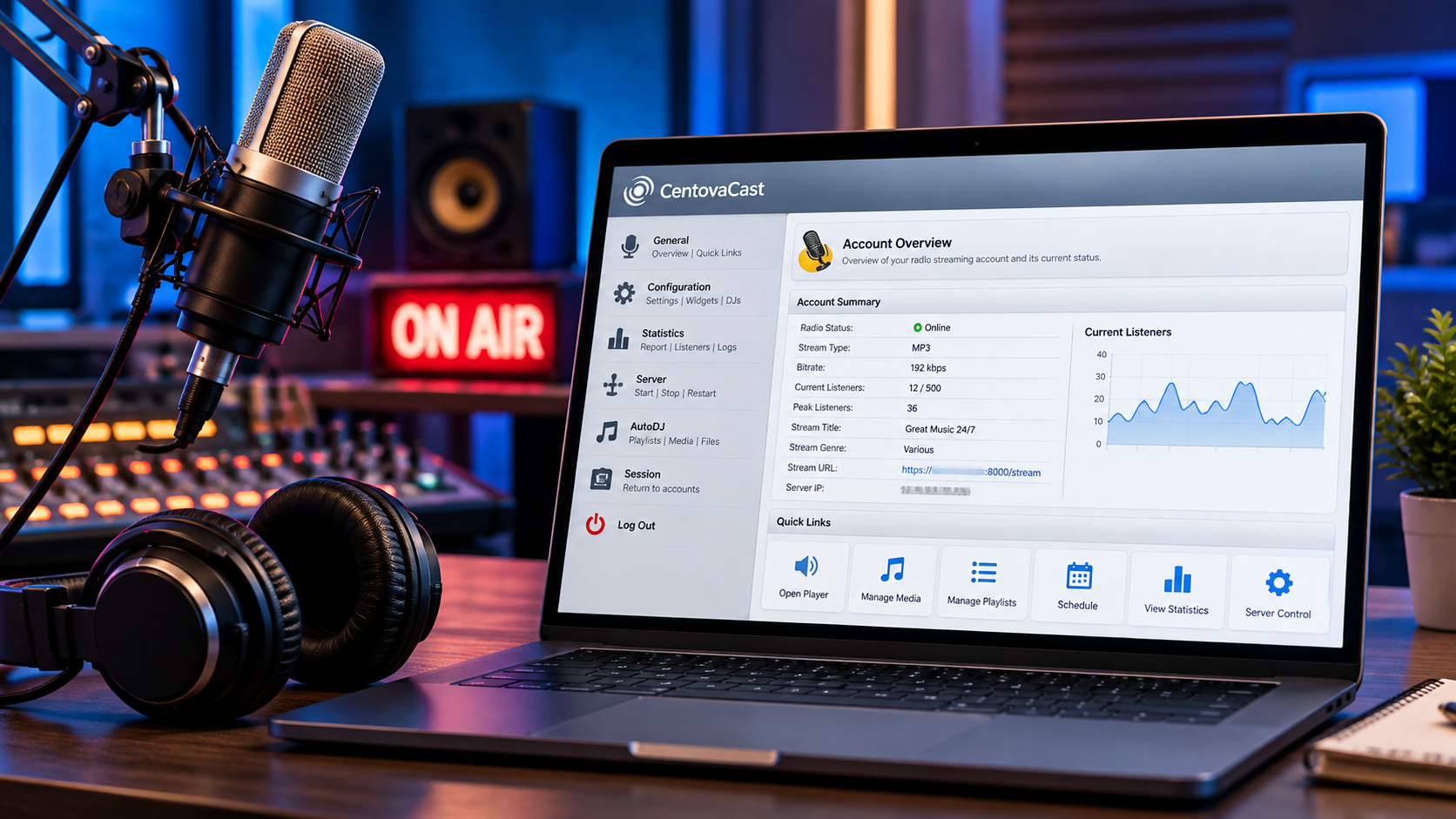
The customer could manage the station through a web based control panel instead of working directly with the underlying streaming server for everyday tasks.
The decision was made after comparing the available platforms and discussing both their capabilities and limitations.
Ucartz and the customer agreed to proceed with Ucartz Radio Hosting powered by CentovaCast.
Choosing the Right Hosting Setup
Selecting the radio platform was only part of the decision.
We also needed to determine how much hosting infrastructure the customer actually needed at the beginning.
The station was new and did not have an established audience yet. There was no reason to purchase infrastructure based on a large listener base that did not yet exist.
The customer did have a budget available for the project and was prepared to spend more if the station later required additional infrastructure or technical resources. They also considered hiring an in house server administrator in the future if the operation became large enough to justify one.
Our recommendation was to start smaller.
There was no immediate need for the customer to purchase and manage a dedicated server. There was also no need to hire a full time server administrator simply to launch the station.
Instead, we recommended starting with a managed CentovaCast radio hosting package from Ucartz.
Ucartz would manage the hosting environment and server side requirements while the customer could concentrate on the actual radio station, its programming, presenters, and content.
This gave the customer a practical starting point without committing a large amount of money to infrastructure before the station had an established audience.
Starting With a Base Setup
The Ucartz radio hosting packages started from around $3, allowing the customer to begin with a relatively small monthly commitment.
The customer selected a CentovaCast package costing less than $10 per month and proceeded with the order.
The approach was deliberately simple.
Start with the infrastructure required for the current stage of the station, operate it, understand the actual audience and workload, and expand later if the requirements increase.
If the station eventually required more storage, more concurrent listeners, more live broadcasting, additional resources, or a different infrastructure model, the setup could be reviewed at that stage.
From Order to a Ready Radio Station
After the customer completed the payment, Ucartz deployed the selected radio hosting service.
The selected service supported instant setup, so the customer did not have to wait for a manual server deployment process.
Once the service was provisioned, the CentovaCast access details were sent to the customer by email.
The customer could then log in to the CentovaCast control panel and begin configuring the station.
The initial setup included:
- Uploading music and recorded programs
- Organising audio files
- Creating playlists
- Configuring AutoDJ
- Setting playback options
- Configuring crossfade behaviour
- Preparing the station for live broadcasting
- Creating the initial programming schedule
The customer could upload audio through the available file management tools and FTP, depending on the type and size of the content being uploaded.
How the Radio Setup Works
At a basic level, the station had two main sources of audio.
The first was automated playback through AutoDJ.
The second was live broadcasting from a presenter.
The automated flow looked like this:
Music and Recorded Programs
↓
CentovaCast Media Library
↓
Playlist and Schedule
↓
AutoDJ
↓
Radio Streaming Server
↓
Internet
↓
Listeners
For a live program, the flow changed:
Presenter
↓
Mixxx
↓
Live Stream Connection
↓
Radio Streaming Server
↓
Internet
↓
Listeners
CentovaCast provided the management layer used by the customer, while the radio hosting environment handled the streaming infrastructure behind the station.
This separation was important because the customer could manage the station without having to manually operate the underlying streaming components.
Setting Up AutoDJ
The customer then configured AutoDJ, which was one of the main requirements from the beginning.
The station did not have a presenter available twenty four hours a day.
Without automated playback, the station would need a live source whenever it wanted to remain on air.
AutoDJ solved that problem.
The customer could upload their audio, organise it into playlists, and configure automated playback so that the station could continue broadcasting when nobody was live.
The customer could also configure playback behaviour, including crossfade and other AutoDJ settings.
This allowed the station to operate continuously without requiring a presenter to manually start every track.
Building the Daily Schedule
The customer created a programming schedule around their planned content.
For example:
| Time | Programming |
| 7:00 AM to 9:00 AM | Morning Music |
| 9:00 AM to 12:00 PM | Music Playlist |
| 12:00 PM to 1:00 PM | Recorded Program |
| 1:00 PM to 5:00 PM | AutoDJ Music |
| 5:00 PM to 7:00 PM | Live Show |
| 7:00 PM to 10:00 PM | Music Playlist |
| 10:00 PM to Midnight | Recorded Programs |
This was only the initial programming model.
The schedule could be changed as the station developed and the customer’s programming requirements became clearer.
The important part was that the station did not depend entirely on a presenter being available at every hour of the day.
Adding Live Broadcasting
AutoDJ handled the automated part of the station, but the customer also needed the ability to broadcast live when a presenter was available.
For live broadcasting, the customer chose Mixxx, an open source DJ and live broadcasting application.
Mixxx runs on the presenter’s computer and acts as the live audio source. It can send the presenter’s music, microphone input, and other audio sources to a compatible internet radio streaming server.
The basic workflow was:
Presenter’s Computer → Mixxx → Ucartz Radio Server → Online Listeners
The presenter could configure Mixxx with the live broadcasting connection details provided for the radio station.
Once connected, the presenter’s live audio could become the active source for the station.
This meant that the presenter did not need direct access to the underlying server.
They needed the broadcasting software and the connection details required to send the live audio to the station.
Switching Between AutoDJ and Live Broadcasting
This created the operating model the customer originally wanted.
When nobody was broadcasting, AutoDJ could continue playing the station’s scheduled content.
When a presenter was ready for a live show, they could connect through Mixxx and take the station live according to the configured setup.
After the live broadcast finished, the station could return to automated programming.
The practical workflow was:
AutoDJ → Live Broadcast → AutoDJ
This allowed the station to remain active even when presenters were not available.
It also meant that a presenter could run a live program without having to manually rebuild the station’s automated schedule afterwards.
Making the Music Flow Naturally
The customer also wanted the automated programming to sound more like a radio station rather than a basic sequence of files.
This is where the crossfade requirement became important.
CentovaCast’s AutoDJ configuration provides controls for crossfade duration, fade in, fade out, and crossfade behaviour.
Instead of waiting for one song to completely finish before beginning the next, the station could be configured so that the tracks overlap during the transition.
The exact result depends on the crossfade settings and the audio being played.
For an automated radio station, this gives the station operator greater control over how the music flows when no presenter is live.
CentovaCast also supports ReplayGain based volume adjustment for compatible audio files. This can help reduce noticeable differences in volume between tracks from different sources.
These settings are small parts of the overall system, but they matter when a large portion of the station’s programming is automated.
What Happens When a Listener Presses Play?
From the listener’s point of view, the process is simple.
The listener opens the station’s streaming URL through a compatible player, website player, mobile application, smart speaker, or another supported streaming client.
The listener does not need access to the CentovaCast management panel.
Their player connects to the station’s streaming endpoint and receives the audio stream continuously over the internet.
Behind that simple play button, the process looks roughly like this:
Station Content
↓
AutoDJ or Live Presenter
↓
Radio Streaming Server
↓
Internet
↓
Listener’s Player
The listener therefore receives one continuous station stream even though the source of that stream can change between automated programming and live broadcasting.
When AutoDJ is active, the stream contains the scheduled automated programming.
When a presenter goes live, the active audio source can change to the live broadcast.
The listener continues listening to the same station.
Understanding Bandwidth and Listener Growth
A radio station’s hosting requirements are not determined only by the number of audio files stored on the server.
The number of simultaneous listeners and the stream bitrate are also important.
For example, a station broadcasting at 128 kbps to 100 simultaneous listeners would require approximately 12.8 Mbpsof outbound audio capacity before accounting for protocol overhead and other traffic.
The same calculation also explains why infrastructure requirements can change significantly as a station becomes popular.
More simultaneous listeners mean more outgoing streaming traffic.
A higher audio bitrate also increases the amount of bandwidth required per listener.
The exact requirements for a station therefore depend on factors such as:
- Stream bitrate
- Number of concurrent listeners
- Duration of broadcasts
- Number of stations
- Number of live broadcasts
- Audio storage requirements
- Recording requirements
- Other services running on the infrastructure
This was another reason we recommended starting with the requirements the station actually had rather than purchasing a much larger infrastructure setup before the audience existed.
Going Live
Once the station configuration was completed, the customer had the basic workflow required to operate the station.
The station could play scheduled content through AutoDJ.
The customer could upload additional audio and create new playlists.
Presenters could connect through Mixxx for live shows.
The station could then return to automated programming when the live broadcast ended.
The result was not simply a streaming URL.
It was a complete operating workflow for the station.
Content → Playlist → AutoDJ → Stream → Listener
or, during a live program:
Presenter → Mixxx → Stream → Listener
What Ucartz Managed and What the Customer Managed
One of the important aspects of the setup was the separation between infrastructure management and station management.
Ucartz Managed
Ucartz provided and managed the hosting environment required for the radio station.
This meant the customer did not need to spend their time:
- Installing the radio hosting environment
- Managing the underlying server
- Maintaining the server operating environment
- Managing the streaming infrastructure directly
Customer Managed
The customer remained in control of the radio station itself.
They managed:
- Music and recorded programs
- Playlists
- AutoDJ
- Programming schedules
- Crossfade settings
- Live broadcasting
- Presenter access
- Day to day station programming
This was exactly the balance the customer needed.
They wanted control over their radio station without taking responsibility for the underlying server administration.
Starting Small With Room to Grow
The most important infrastructure decision was not to overbuild the setup at launch.
The station was new and had no established audience yet.
Instead of immediately purchasing a dedicated server or hiring a full time server administrator, the customer started with a small managed CentovaCast hosting package.
This allowed them to establish the station, test their programming workflow, begin broadcasting, and understand their actual operational requirements.
If the station grows, the infrastructure can grow with it.
Future requirements may include:
- More concurrent listeners
- Higher bandwidth requirements
- More storage
- More live programs
- Additional presenters
- More radio stations
- Recording and archive requirements
- Additional server resources
- Dedicated technical administration
At that stage, the hosting architecture can be reviewed based on actual usage rather than assumptions made before launch.
The Result
The customer moved from having a radio station concept to having a working internet radio setup without having to build the underlying infrastructure themselves.
The initial setup provided:
- Managed radio hosting from Ucartz
- CentovaCast for station management
- Audio file management
- FTP based media upload
- Playlists
- AutoDJ
- Program scheduling
- Crossfade controls
- ReplayGain support for compatible audio
- Live broadcasting through Mixxx
- A continuous station stream
- The ability to switch between automated and live programming
Most importantly, the customer could operate the station without becoming a server administrator.
They could concentrate on their music, programs, presenters, and audience while Ucartz managed the hosting environment behind the station.
What the Customer Learned
The project demonstrated that launching an internet radio station does not necessarily require a dedicated server or a full time server administrator from day one.
The right infrastructure depends on the actual stage of the station.
At launch, this station had:
- One radio station
- No established audience
- Automated programming requirements
- Live broadcasting requirements
- A need for crossfade control
- A need for simple station management
- A plan to expand if the station grew
A small managed hosting setup was therefore sufficient for the initial stage.
As the audience and operational requirements change, the infrastructure can be reviewed and expanded.
The Takeaway
The important part of this project was not simply putting a stream online.
It was choosing the right combination of platform, hosting, automation, and live broadcasting tools for the station’s actual requirements.
The process was straightforward:
Understand the requirements
↓
Compare the available radio platforms
↓
Discuss the advantages and limitations
↓
Select CentovaCast
↓
Choose an appropriately sized managed hosting package
↓
Deploy the service
↓
Configure playlists and AutoDJ
↓
Set up live broadcasting with Mixxx
↓
Test the station workflow
↓
Go live
The customer did not need to build a complete broadcasting infrastructure from scratch.
They started with a practical managed setup, kept the initial infrastructure cost low, and retained the ability to expand later as the station developed.
For Ucartz, the objective was not to sell the largest server available.
It was to understand what the customer needed at that stage, provide the infrastructure required to get the station running, and leave a clear path for the next stage of growth.