
The 60-Second Answer
- Choose n8n if: You want faster setup, visual workflows, 400+ integrations, and minimal coding.
- Choose custom scripts if: You need full control, high performance, or highly specific business logic.
- Use both if: You want scalable automation n8n for orchestration, Python/Bash for the heavy lifting.
Every team whether marketing, operations, or engineering is actively trying to eliminate repetitive work to free up time for higher-value thinking.
The real question isn’t whether to automate. It’s how. Choosing the wrong tool early can lock you into months of painful rewrites, or leave your non-technical teammates unable to maintain the system you built.
This guide gives you a practical, opinionated breakdown so you can pick the approach that works for your team long-term complete with real code examples, cost analysis, and clear guidance on when to use each.
What Is n8n?
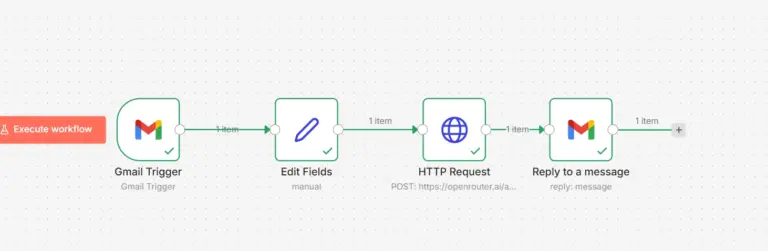
n8n (pronounced “n-eight-n”) is an open-source, node-based automation platform that lets you connect apps and build workflows visually. Think of it like a visual programming environment where each “node” is a step in your workflow.
A typical n8n workflow looks like this:
Webhook Trigger → Google Sheets → Filter node → Gmail → Slack
You build this visually in minutes no authentication boilerplate, no error-handling from scratch, no deployment setup. n8n ships with 400+ pre-built integrations and an HTTP Request node that connects to virtually any API.
What Are Custom Scripts?
Custom scripts are automation written manually using programming languages. The two most common choices are:
- Python – ideal for: APIs, data processing, AI pipelines, and complex logic
- Bash – ideal for: Server tasks, cron jobs, file operations, and system automation
The same lead automation example in Python:
import requests
from slack_sdk import WebClient
# Fetch leads from your API
response = requests.get('https://yourapi.com/leads',
headers={'Authorization': 'Bearer TOKEN'})
leads = response.json()
# Filter qualified leads
qualified = [l for l in leads if l['score'] >= 80]
# Notify for each qualified lead
for lead in qualified:
   send_email(lead['email']
   slack_client.chat_postMessage(
                         channel='#sales'
     text=f"New lead: {lead['name']}"
                                                   )
This gives you total control but you wrote every line. You also handle auth tokens, error retries, logging, and deployment yourself.
2026 Updates That Change This Decision
n8n now includes an AI workflow builder that generates entire workflows from plain-text prompts, making it even faster to get started. Docker deployments are now single-command, the community nodes ecosystem has grown significantly, and error handling plus execution logs have been meaningfully improved.
Python programming language has solidified its position as the dominant language for AI and automation powering LLMs, agents, and pipelines. FastAPI adoption has risen sharply, making lightweight Python APIs faster to build and deploy than ever. Bash remains relevant for DevOps tasks but is increasingly less common for business-level automation.
n8n is becoming more beginner-friendly with every release. Python is becoming more powerful but also more specialized. Hybrid setups n8n for orchestration, Python for computation are now the default architecture for teams that need both speed and scale.
Head-to-Head Comparison
Here’s how the two approaches stack up across the dimensions that matter most for real teams:
| Aspect | n8n | Custom Scripts (Python/Bash) |
| Interface | Visual drag-and-drop | Code-based (IDE / terminal) |
| Setup time | Fast minutes | Medium to slow |
| Learning curve | Moderate | High (for beginners) |
| Flexibility | High (with Code Node) | Unlimited |
| Debugging | Visual logs per node | Manual logs / stack traces |
| Maintenance | Easier for non-devs | Requires dev discipline |
| Performance | Good for most tasks | Better for heavy compute |
| Integrations | 400+ built-in | Unlimited (you build them) |
| Self-hosting cost | Free software + server | Developer time is main cost |
Performance & Scaling Reality
n8n n8n handles thousands of workflow executions per day without issue for most business use cases. Bottlenecks appear when workflows involve heavy loops or large datasets processed inside n8n itself rather than offloaded to an external service. When you hit those limits, n8n scales horizontally through queue mode and worker nodes meaning you can run multiple execution workers behind a single n8n instance.
Python Scripts Python outperforms n8n for batch processing, streaming data pipelines, and any workload that requires high compute. When performance is the primary requirement parsing millions of records, running model inference, or handling concurrent async jobs .Python with the right libraries will always be the more capable tool.
Lead Automation-Example
Let’s take a concrete scenario: a form submission triggers a lead qualification flow append the lead to a spreadsheet, filter by score, send a personalized email, and notify Slack.
Built with n8n
You drag nodes onto the canvas: Form Trigger → Google Sheets → Switch → Gmail → Slack. Each node has a UI to configure credentials, fields, and conditions. Total build time for a mid-level user: under 30 minutes.
Key advantage: No authentication boilerplate. No error handling written from scratch. Visual debugging shows exactly which node failed and why. Any team member can read the workflow — not just the developer who built it.
Built with Python
You write logic to handle the form input, authenticate with Google Sheets API (OAuth flow), query and filter data, connect to SMTP or a transactional email API, hit the Slack API then deploy this somewhere, add logging, set up monitoring, and handle retries.
Faster for experienced developers once mature but the initial setup cost and ongoing maintenance burden is significant. If the developer who built it leaves, the next person has a steep ramp-up.
Cost Breakdown
| Cost Factor | n8n (Self-Hosted) | Custom Scripts |
| Software | Free (open source) | Free (Python/Bash) |
| Hosting | $10-40/month (VPS) | Same hosting required |
| Developer time | Low anyone can maintain | High devs only |
| Onboarding | Hours | Days to weeks |
| Best for | Most teams and budgets | Dev-heavy teams with complex needs |
The hidden cost of custom scripts is developer time. If your team bills at ₹2,000/hour internally, a single week of script development easily dwarfs years of n8n hosting costs. Scripts become cost-effective only when your use case genuinely demands the control they provide.
Where Each Approach Wins
n8n Wins At:
- Rapid prototyping and MVPs
- Business process automation (CRM, email, spreadsheets)
- Non-technical or mixed teams who need to maintain workflows
- Multi-tool SaaS integrations
- Workflow visibility and auditability
- Recurring scheduled tasks with clear triggers
Custom Scripts Win At:
- Heavy computation or large-scale data processing
- Performance-critical automation pipelines
- Complex AI and ML workflows
- Custom backend business logic with fine-grained control
- Version-controlled, testable, and reviewable automation
- Tasks needing precise error handling and retry logic
Decision Framework: Choose in 30 Seconds
Use n8n if you answer YES to any of these: You need automation running this week. Your team includes non-technical members. You’re connecting multiple SaaS tools. You’re budget-sensitive and want near-zero software cost.
Use Python/Bash if you answer YES to any of these: You’re processing large datasets. You’re building AI or ML workflows. You’re integrating automation into a backend system. You have a strong developer team already in place.
Use both if: You want to move fast now and scale properly later start with n8n to build and validate, then extend with Python where the logic demands it.
The Hybrid Approach: Best of Both Worlds
Here’s what most mature engineering teams actually do in 2026: they use both tools together, each doing what it’s best at.
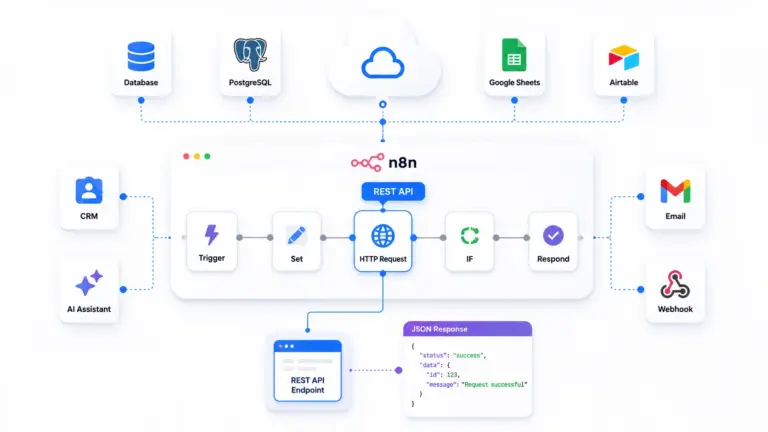
n8n handles the orchestration layer triggers, integrations, routing, notifications. Python handles the computation layer data transformations, AI inference, and complex logic. The two communicate over HTTP: n8n calls a Python API endpoint, gets structured data back, then routes the result wherever it needs to go.
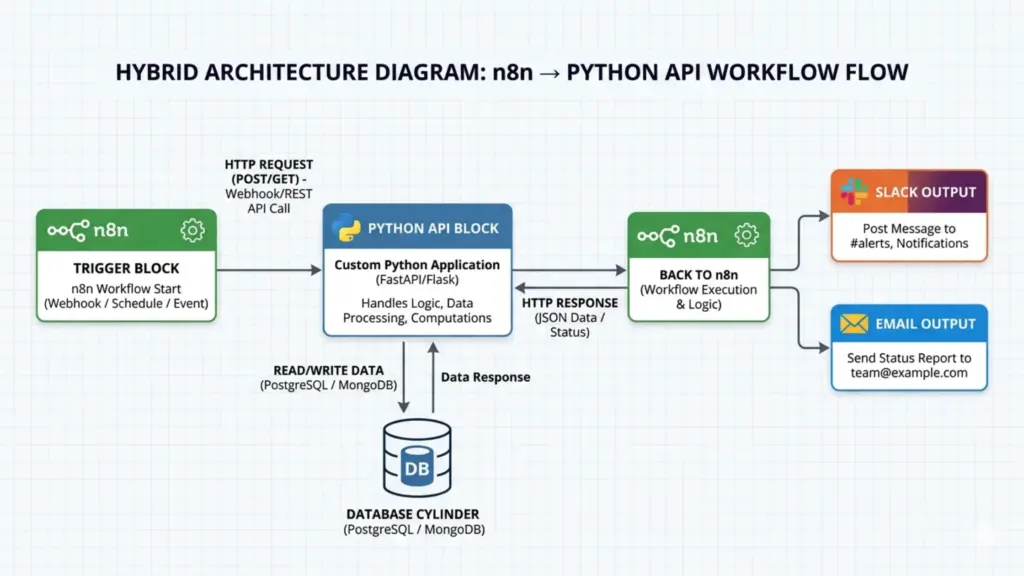
Example Hybrid Flow:
n8n Trigger → n8n HTTP Request Node → Python API (process/ML) → n8n Routes Result → Slack / Email
Why this works: Your non-technical team members can read and modify the n8n workflow changing where results go, adding new notification channels, or updating filters. Meanwhile, engineers focus Python effort on the logic that genuinely needs code-level precision. Everyone works at the right level of abstraction.
Real Architecture Examples by Team Size
Startup Setup n8n handles all triggers and API connections, routing results directly to Slack or email. No Python needed at this stage move fast, validate the workflow, keep it simple.
Scaling Setup n8n triggers the workflow and calls a Python FastAPI endpoint that handles the heavy logic, writes results to a database, and returns structured data that n8n routes to a dashboard or notification channel.
Enterprise Setup n8n acts as the orchestration layer across all business workflows. Python microservices handle computation, AI inference, and data transformation. A Redis queue manages execution load between services. A monitoring layer with structured logs and alerts sits across the entire stack.
Learning Curve by Skill Level
- Beginner: Start with n8n. Visual workflows make it easy to understand automation concepts without fighting syntax errors.
- Intermediate: n8n + Python. Use n8n for orchestration and add Python scripts for tasks that need real logic called via HTTP from n8n’s HTTP Request node.
- Advanced: Full hybrid. n8n as the glue layer, Python/Bash microservices for computation. Deploy with Docker Compose, monitor with proper logging stacks.
When to Choose Each
Choose n8n when:
- You want working automation within hours, not days
- Your team includes non-developers who need to maintain workflows
- You’re integrating multiple SaaS tools (CRMs, spreadsheets, messaging apps)
- You’re building an MVP and iteration speed matters more than optimization
- You want visual debugging and built-in logging without extra setup
Choose custom scripts when:
- You need complete control over every line of execution logic
- You’re building backend systems that need to be rigorously tested
- Performance is critical processing millions of rows or running ML inference
- Your team is developer-heavy and already has Git, CI/CD, and monitoring in place
- The automation logic is so complex it becomes unreadable in a visual tool
Can You Migrate Later? Yes ,But Plan for It
Migrating between tools is possible, but it is always manual work. There is no one-click export from n8n to Python or vice versa.
Migrate from n8n to Python when: Your workflows are hitting performance limits, the logic has grown too complex to manage visually, or you need fine-grained control that n8n’s Code Node can’t cleanly provide.
Migrate from Python to n8n when: Maintenance overhead has become too high, the original developer has left, or your team needs visibility into what the automation is doing without reading code.
The cleanest strategy is to avoid a full migration entirely start with n8n, identify the 20% of logic that genuinely needs code, and build only that in Python. You get the benefits of both without ever needing to rewrite the whole system.
The Common Mistake to Avoid
The biggest mistake teams make is defaulting to custom scripts too early because it “feels more professional” or more scalable.
The reality: most business automation doesn’t need custom code. Choosing scripts prematurely means:
- Slow initial development – weeks instead of hours
- High complexity – every edge case needs explicit handling
- Bus-factor risk – only the original developer understands the system
- Hard maintenance – integrations break when third-party APIs update
Start with n8n, prove the workflow works, then extract only the parts that genuinely need code into Python services. This is how modern automation systems are actually built.
Conclusion
Choosing between n8n and custom scripting with Python or Bash comes down to how you balance speed, control, and scalability.
- n8n gives you: Speed, visibility, and easy integrations out of the box
- Custom scripts give you: Control, flexibility, and unlimited power
For most real-world scenarios in 2026, the best approach is combining both.
Start with n8n to build quickly. Use scripts where complexity demands it. That’s how modern, maintainable automation systems are built and how the best teams ship automation that actually lasts. We have suitable KVM VPS hosting plans to support your n8n journey. Start today!
FAQ
Q1: Is n8n better than Python for automation?
n8n is better than Python for automation when you need speed and integrations, but Python is better when you need full control, complex logic, or high performance.
Q2: Can non-technical users use n8n?
Yes, n8n is designed for non-technical users because it uses a visual drag-and-drop interface that requires little to no coding knowledge.
Q3: When should I use custom scripts instead of n8n?
You should use custom scripts instead of n8n when your automation requires heavy computation, performance-critical processing, or complex logic that becomes unmanageable in a visual tool.
Q4: What is the hybrid automation approach?
The hybrid approach means using n8n to handle triggers, integrations, and routing while using Python scripts to handle the heavy computation and complex logic that n8n calls via HTTP.
Q5: Is n8n good for beginners?
Yes, n8n is the best starting point for beginners because its visual interface makes automation concepts easy to understand without needing to learn syntax or handle errors manually.
Q6: Can n8n replace Python for automation?
n8n cannot fully replace Python because while it handles most business automation tasks efficiently, Python is still required for AI pipelines, heavy data processing, and highly custom backend logic.
Q7: What is the biggest mistake teams make with automation?
The biggest mistake teams make is choosing custom scripts too early, which leads to slow development, high complexity, and systems that only the original developer can maintain.
Q8: What is the best automation tool for small businesses in 2026?
The best automation tool for small businesses in 2026 is n8n because it offers fast setup, 400+ integrations, visual debugging, and near-zero software cost when self-hosted.