Scenario:
Unable to send an email using the STARTTLS authentication:
454 4.7.0 TLS not available due to local problem
The following error can be found in the /var/log/maillog file:
postfix/smtpd[26508]: warning: cannot get RSA certificate from file /etc/postfix/postfix_default.pem: disabling TLS support
postfix/smtpd[26508]: warning: TLS library problem: 26508:error:02001002:system library:fopen:No such file or directory:bss_file.c:355:fopen('/etc/postfix/postfix_default.pem','r'):
postfix/smtpd[26508]: warning: TLS library problem: 26508:error:20074002:BIO routines:FILE_CTRL:system lib:bss_file.c:357:
postfix/smtpd[26508]: warning: TLS library problem: 26508:error:140DC002:SSL routines:SSL_CTX_use_certificate_chain_file:system lib:ssl_rsa.c:722:
Reasons:
TLS misconfiguration in Postfix:
The postfix_default.pem certificate file does not contain the valid SSL certificate or it is broken.
The path to the certificate is incorrect in the /etc/postfix/main.cf file.
TLS configuration parameters are missing in the /etc/postfix/main.cf file.
Solution:
Using Plesk:
- Log in to Plesk.
- Go to Tools & Settings > SSL/TLS Certificates.
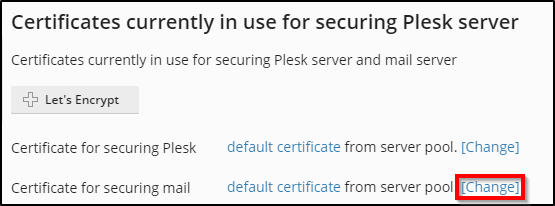
- Click the Change link opposite the Certificate for securing mail option:
- Specify the correct Certificate in the Select Certificate drop-down menu.
- Press the OK button to apply changes.
- If the issue persists, compare the current configuration with the steps from the "via SSH" section and fix the configuration if it is required.
Using SSH:
1. Connect to the server via SSH.
2. Create the /etc/postfix/tls directory, set correct ownership, group, permissions and create a certificate file:
mkdir /etc/postfix/tls
# chown root:postfix /etc/postfix/tls
# chmod u=rwx,go= /etc/postfix/tls
# cd /etc/postfix/tls
# openssl req -new -x509 -nodes -out smtpd.pem -keyout smtpd.pem -days 3650
3. Change /etc/postfix/main.cf accordingly:
smtpd_tls_CAfile = /etc/postfix/tls/smtpd.pem
smtpd_tls_cert_file = /etc/postfix/tls/smtpd.pem
smtpd_tls_key_file = /etc/postfix/tls/smtpd.pem
smtpd_tls_session_cache_database = btree:${queue_directory}/smtpd_scache
smtpd_tls_security_level = may
smtpd_use_tls = yes
smtp_tls_security_level = may
smtp_tls_CAfile = /etc/postfix/tls/smtpd.pem
smtp_tls_cert_file = /etc/postfix/tls/smtpd.pem
smtp_tls_key_file = /etc/postfix/tls/smtpd.pem
smtp_tls_session_cache_database = btree:${queue_directory}/smtp_scache
smtp_use_tls = yes
smtpd_tls_received_header = yes
smtpd_tls_ask_ccert = yes
smtpd_tls_loglevel = 1
tls_random_source = dev:/dev/urandom
4.If the smtpd_sasl_auth_enable = yes option is set in the /etc/postfix/main.cf file, make sure that the saslauthd service is started:
service saslauthd status
5. Reload Postfix configuration:
service postfix restart
Done!!
