
Nanobot is a lightweight AI agent framework with around 4,000 lines of code, designed for simplicity, customization, and low resource usage. Clawdbot is a large-scale AI framework with over 400,000 lines of code, built for enterprise-grade automation and complex workflows. Choose Nanobot for learning and lightweight automation, and Clawdbot for large, scalable systems.
You want to build a personal AI assistant. Something simple check your calendar, answer questions, maybe automate a few tasks.
You Google “AI agent framework” and find two options:
Option A: 400,000+ lines of code. Dozens of dependencies. 4-hour setup process. Enterprise-grade architecture with features you’ll never touch.
Option B: 3,897 lines of code. Minimal dependencies. 15-minute setup. Does everything you actually need.
Which one do you pick?
Most developers instinctively reach for the “enterprise solution,” thinking bigger must mean better. But what if that’s wrong? What if 99% smaller actually gives you more power, not less? Nanobot and OpenClaw represent two fundamentally different philosophies about building AI agents and choosing the wrong one will waste weeks of your time.
Let’s break down what each framework actually does, who should use them, and why the answer might surprise you.
What Is Nanobot?
Nanobot is an ultra-lightweight personal AI assistant that proves you don’t need massive codebases to build powerful AI agents.
Core Characteristics
Lines of Code: ~3,897 (verifiable via bash core_agent_lines.sh)
Philosophy: Radical minimalism ship only what 95% of users actually need
Language: Pure Python with minimal dependencies
Architecture: Four simple layers (input → reasoning → execution → output)
What Makes It Different
Readable Codebase: You can actually read and understand the entire framework in a weekend. No mysterious “framework magic” or hidden abstractions.
Multi-Platform Support:
- Telegram (recommended)
- Discord
- Slack
- Terminal/CLI
- Web interface
Model Agnostic: Works with any OpenAI-compatible API:
- GPT-4, Claude, Gemini
- Cheaper alternatives (Kimi, DeepSeek, Groq)
- Local models (via vLLM, Ollama)
- 50+ providers through OpenRouter
Real Capabilities:
- Execute shell commands
- Read/write files
- Schedule tasks (cron)
- Persistent memory
- MCP (Model Context Protocol) support
- Background task execution
- Custom plugin system
Resource Requirements
Minimum specs:
- 512MB RAM
- 100MB disk space
- Python 3.8+
Runs perfectly on:
- Raspberry Pi
- $5/month VPS
- Your laptop
- Shared hosting
Startup time: Under 1 second
What Is Clawdbot?
Clawdbot (also known as OpenClaw) is a comprehensive AI agent orchestration framework built for enterprise-scale deployments.
Core Characteristics
Lines of Code: 430,000+ (100x larger than Nanobot)
Philosophy: Comprehensive coverage solve every possible use case out of the box
Language: Python with extensive dependency tree (50+ packages)
Architecture: Multi-layered with middleware, service routing, and distributed coordination
Enterprise Features
Multi-Tenancy: Isolated workspaces for different teams or customers with strict security boundaries
Advanced Workflow Engine: Visual flow builders, complex routing logic, conditional branching, parallel execution
Plugin Ecosystem: Hundreds of pre-built integrations for enterprise tools (Salesforce, SAP, ServiceNow, etc.)
Observability: Built-in monitoring, analytics dashboards, audit logs, compliance reporting
Team Collaboration: Role-based access control, approval workflows, shared agent templates
Scale Capabilities
Designed to handle:
- 1,000+ concurrent users
- Millions of messages per day
- Complex multi-step automations
- Cross-system integrations
- High-availability deployments
Resource requirements:
- 2GB+ RAM minimum
- Dedicated server recommended
- Redis/database backends
- Load balancer for production
Key Differences: Comparison
| Feature | Nanobot | Clawdbot |
|---|---|---|
| Code Size | ~4,000 LOC | 400,000+ LOC |
| Complexity | Low | Very High |
| Setup Time | 15 minutes | 2-4 hours |
| Learning Curve | 1-2 days | 1-2 weeks |
| Resource Usage | 50-80 MB RAM | 200-400 MB RAM |
| Startup Time | <1 second | 5-8 seconds |
| Dependencies | ~10 packages | 50+ packages |
| Best For | Individuals, small teams, learning | Enterprises, large teams, production scale |
| Customization | Edit code directly | Plugin architecture + config |
| Documentation | Code is documentation | Extensive guides + API docs |
| Multi-Tenancy | Basic (single user focus) | Enterprise-grade isolation |
| Scalability | 1-100 users | 1,000-10,000+ users |
| Cost to Run | $5-10/month | $50-500+/month |
| Visual Workflow Builder | No | Yes |
| Built-in Analytics | No | Yes |
| Support Model | Community | Community + Commercial |
| Flexibility | Manual coding | Configuration-driven |
| Deployment Options | VPS, local, Docker | K8s, cloud platforms, on-prem |
Performance & Resource Usage
Nanobot Performance Profile
Memory Footprint:
- Idle: 45-60 MB
- Active conversation: 60-80 MB
- Peak usage: ~100 MB
CPU Usage:
- Idle: 0.5-1%
- Processing: 5-15%
- Response time: 1-4 seconds (mostly API latency)
Disk Space:
- Core installation: 85 MB
- With dependencies: ~150 MB
- Conversation history: Grows slowly (~1MB per 1000 messages)
Network:
- Minimal bandwidth (only API calls)
- No persistent connections (polling-based)
- Works fine on mobile hotspots
Real-world example: Running Nanobot on a $5/month Digital Ocean droplet (1GB RAM, 1 CPU) handles 20-50 messages per day comfortably with resources to spare.
Clawdbot Performance Profile
Memory Footprint:
- Base installation: 200-300 MB
- With typical plugins: 400-600 MB
- Under load: 1GB+
CPU Usage:
- Idle: 2-5%
- Processing: 15-30%
- Heavy workflows: 50%+
Disk Space:
- Full installation: 2-5 GB
- With logs and data: 10GB+
- Database requirements: Additional space
Network:
- Higher bandwidth (WebSocket connections)
- Database connections
- Service mesh communication
Real-world example: Clawdbot production deployments typically run on dedicated servers (4GB+ RAM, 2+ CPUs) or managed Kubernetes clusters.
When Performance Matters
Choose Nanobot if:
- Running on limited hardware (Raspberry Pi, cheap VPS)
- Want instant startup times
- Need minimal resource consumption
- Optimizing for cost
Choose Clawdbot if:
- Need to handle high throughput (1000+ messages/hour)
- Require guaranteed uptime (99.9%+)
- Running complex, long-duration workflows
- Performance monitoring is critical
Real-World Use Cases
Understanding where Nanobot and Clawdbot actually fit helps in choosing the right framework.
1.Personal AI Assistant
Nanobot works well as a personal AI assistant that runs on your own machine or VPS hosting.
You can use it to:
• manage daily tasks
• summarize content
• answer queries across platforms like Telegram or Slack
• store and recall personal context
Because the codebase is small, it’s easy to customize behavior based on your needs.
Clawdbot can also do this, but its complexity is often unnecessary for personal use.
2.Workflow Automation
Both frameworks support automation, but their approach differs.
Nanobot handles:
• scheduled tasks (cron jobs)
• simple API integrations
• lightweight automation workflows
Clawdbot is better suited for:
• multi-step enterprise workflows
• large-scale automation pipelines
• complex integrations across multiple systems
If your automation needs are straightforward, Nanobot is faster to set up and maintain.
3.Research Prototypes
Nanobot is highly effective for research and experimentation.
Developers and researchers use it to:
• study AI agent architecture
• test new prompts and tools
• build prototypes quickly
• experiment with different LLM providers
Its small and readable codebase makes it ideal for learning how AI agents actually work.
Clawdbot, while powerful, requires significantly more time to understand before experimentation.
4.Enterprise AI Orchestration
Clawdbot is designed for large-scale environments where multiple systems and workflows need to interact.
Typical use cases include:
• enterprise automation systems
• multi-agent coordination
• large data processing pipelines
• organization-wide AI deployments
Nanobot is not built for this level of complexity, but it can still serve as a lightweight internal tool for smaller teams.
Final Verdict: Which Should You Choose?
The Decision Framework
Ask yourself these questions:
1. How many users?
- 1-10 users → Nanobot
- 10-100 users → Nanobot (probably)
- 100-1000 users → Clawdbot
- 1000+ users → Clawdbot (definitely)
2. What’s your technical background?
- Beginner/intermediate → Nanobot (learn first)
- Advanced developer → Either (based on scale)
- Enterprise architect → Clawdbot
3. What’s your budget?
- <$50/month → Nanobot
- $50-500/month → Nanobot (still viable)
- $500+/month → Clawdbot (if scale justifies)
4. How important is understanding internals?
- Very important → Nanobot
- Somewhat important → Nanobot
- Don’t care, just need it working → Clawdbot
5. Timeline to production?
- Need it today → Nanobot
- This week → Nanobot
- This month → Either
- Multi-month project → Clawdbot
6. Team size?
- Solo or 2-3 people → Nanobot
- 5-10 people → Either
- 10+ people → Clawdbot
Clear Recommendations
Choose Nanobot if 3+ of these apply:
- Learning or experimenting
- Personal or small team use
- Limited budget (<$50/month)
- Want to understand internals
- Need fast setup
- Prefer code over configuration
- Limited resources (Raspberry Pi, cheap VPS)
Choose Clawdbot if 3+ of these apply:
- Production enterprise system
- 100+ users
- Complex workflows across many services
- Non-technical users need access
- Compliance/regulatory requirements
- Budget >$500/month
- Need professional support
The Hybrid Strategy (Recommended for Many)
Start with Nanobot:
- Learn AI agent concepts
- Build your first automation
- Understand what you actually need
- Prototype features quickly
Graduate to Clawdbot when:
- User count exceeds comfortable scale
- Enterprise features become necessary
- Budget supports infrastructure
- Team size requires collaboration features
Keep both:
- Nanobot for personal use and prototyping
- Clawdbot for production team features
It’s using the right tool for each job.
Common Misconceptions
“Smaller codebase means fewer features”
False.
Nanobot has:
- Multi-model support ✓
- Multiple chat platforms ✓
- Tool execution ✓
- Persistent memory ✓
- Scheduled tasks ✓
- Background processing ✓
- MCP integration ✓
The difference: Clawdbot has enterprise features (multi-tenancy, visual builders, advanced analytics) that personal users don’t need.
“Clawdbot is better maintained”
Not necessarily.
Both are actively developed. Nanobot’s small size means:
- Faster bug fixes (easier to locate issues)
- Cleaner releases (fewer moving parts)
- More stable (less complexity = fewer bugs)
Clawdbot has more contributors but also more complexity to manage.
“You can’t scale Nanobot”
Half true.
You can’t scale to 10,000 users without modification. But you can:
- Run multiple instances
- Add caching layers
- Optimize performance
- Handle 100+ users comfortably
The real limit: When you need features Nanobot deliberately doesn’t include (multi-tenancy, visual workflows, admin dashboards).
“Clawdbot is too complex for beginners”
True for building, false for using.
Beginners can use Clawdbot through visual workflow builders without touching code.
Beginners who want to understand AI agents should start with Nanobot.
“This is a fair comparison”
Actually, it’s not.
These frameworks have different goals:
- Nanobot: Personal use, learning, transparency
- Clawdbot: Enterprise scale, comprehensive features
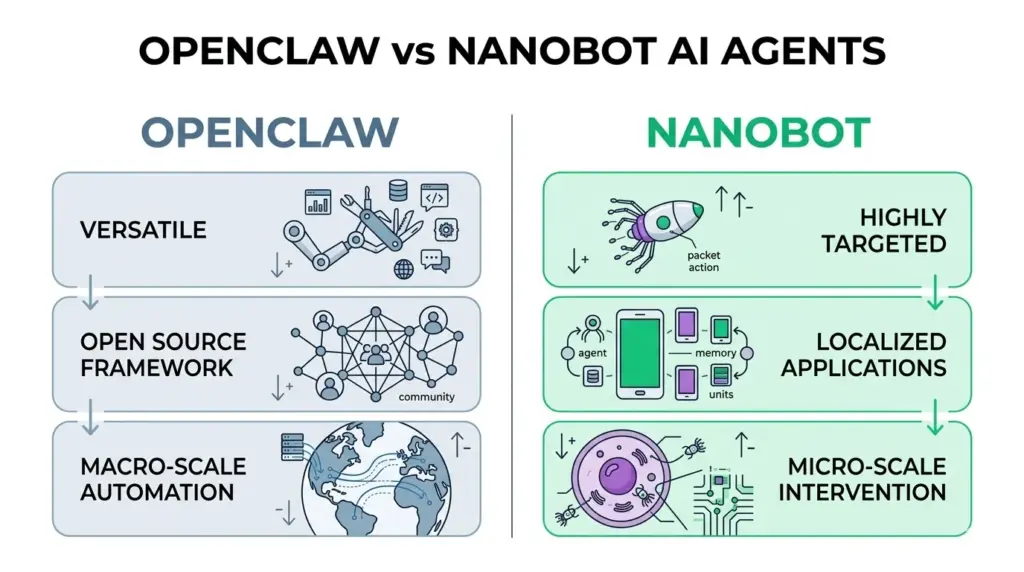
Like comparing:
- A sports car vs a bus
- A swiss army knife vs a toolbox
- A studio apartment vs an office building
Both are excellent. Just for different purposes.
Conclusion
The comparison between Nanobot and Clawdbot highlights a clear difference in philosophy.
Nanobot focuses on simplicity, clarity, and control. With a small codebase, it allows developers to build, understand, and customize an AI assistant without dealing with unnecessary complexity.
Clawdbot focuses on scale, extensibility, and enterprise capability. It provides a wide range of features but comes with a heavier architecture and steeper learning curve.
Choosing between them depends on your needs:
• For learning, prototyping, and lightweight automation, Nanobot is more practical
• For large-scale systems and enterprise workflows, Clawdbot offers more depth
Both frameworks serve different purposes. The decision comes down to how much complexity your use case actually requires.
In many cases, a smaller and more understandable system like Nanobot is enough to build powerful AI-driven solutions.
FAQ
1. What is the main difference between Nanobot and Clawdbot?
Nanobot focuses on simplicity and lightweight design, while Clawdbot is built for large-scale, complex automation systems.
2. Is Nanobot enough for building AI agents?
Yes. Nanobot supports core agent features like chat, memory, and automation, making it sufficient for most personal and developer use cases.
3. Why is Clawdbot so large?
Clawdbot includes extensive features, plugins, and enterprise-level capabilities, which increase its codebase size significantly.
4. Which is better for beginners: Nanobot or Clawdbot?
Nanobot is better for beginners because its smaller codebase is easier to understand and modify.
5. Can Nanobot replace Clawdbot?
Nanobot can replace Clawdbot for simple and moderate use cases, but not for highly complex enterprise workflows.