Dedicated servers dominated hosting for decades. Now edge computing challenges that dominance.
The future of dedicated hosting lies in combining core data center power with edge computing nodes so your workloads run faster, closer to users, and with lower latency.
This guide reveals how hosting dedicated servers and edge computing work together. You’ll discover why this hybrid approach outperforms either technology alone.
Why Choose a Dedicated Server?
Dedicated servers provide exclusive hardware access for your applications.
Unlike shared hosting, no other websites compete for your resources. Your site gets 100% of CPU, RAM, storage, and bandwidth.
Complete resource control eliminates performance bottlenecks. Your applications run at full hardware capacity without interruption.
Predictable performance maintains consistent speed. Traffic spikes don’t slow your site because resources aren’t shared.
Custom configuration enables specialized setups. Install any software, configure any service, optimize for specific workloads.
Enhanced security isolates your data. No neighboring sites can access your files or compromise your security.
Scalability supports growth. Upgrade hardware components without migration headaches.
Performance and Reliability for Demanding Websites
Dedicated servers excel at handling resource-intensive applications.
High-traffic e-commerce sites need consistent performance during sales events. Shared hosting crashes when traffic spikes 10x. Dedicated servers handle spikes smoothly.
Database-heavy applications require fast disk I/O. NVMe SSD storage in dedicated servers delivers 7x faster database queries than standard SSD.
Video streaming platforms demand high bandwidth. Dedicated servers provide unmetered bandwidth options supporting thousands of concurrent streams.
Anti-DDOS Gaming Dedicated servers require low latency. Dedicated hardware eliminates “noisy neighbor” problems that cause lag spikes.
Performance comparison:
| Hosting Type | Page Load Time | Concurrent Users | Uptime SLA |
| Shared | 2.8-4.5 seconds | 50-200 | 99.5% |
| VPS | 1.5-2.5 seconds | 200-500 | 99.9% |
| Dedicated | 0.4-1.2 seconds | 5,000-50,000+ | 99.99% |
Enhanced Security: Isolation, DDoS Protection, and Firewall Control
Security improves dramatically with dedicated server isolation.
Hardware-level separation prevents cross-contamination. Vulnerabilities in other sites cannot affect your server.
Custom firewall rules block threats specific to your applications. Configure exactly which ports and protocols your server accepts.
DDoS protection absorbs volumetric attacks before they reach your server. Enterprise-grade mitigation handles multi-gigabit floods.
Root access control restricts who can make system changes. Implement least-privilege principles for team members.
Compliance support enables regulatory adherence. HIPAA compliance guidelines , PCI-DSS, and GDPR compliance become achievable with proper dedicated server configuration.
How Dedicated Servers Improve Website Security and Performance
Dedicated infrastructure creates measurable improvements in both security and speed.
Security enhancements:
Isolated environment prevents lateral movement. Attackers compromising neighboring sites cannot pivot to yours.
Custom security software installations protect uniquely. Install specialized intrusion detection systems matching your threat profile.
Private IP addresses obscure your presence. Shared hosting IP addresses appear in bulk scans as high-value targets.
Dedicated resources for security tools enable comprehensive protection. Run resource-intensive antivirus scanning without impacting performance.
Performance improvements:
Zero resource contention guarantees consistent speed. CPU and RAM remain available exactly when needed.
Optimized configurations match your specific needs. Tune database settings, cache layers, and web server parameters perfectly.
Low-latency storage accelerates data access. Direct-attached NVMe drives eliminate network storage delays.
Predictable networking ensures reliable bandwidth. No burst throttling or fair-use policies limit your traffic.
Combined security and performance benefits:
| Optimization | Security Impact | Performance Impact |
| Custom kernel | Reduced attack surface | 15-25% faster |
| Dedicated firewall | 87% fewer attacks reach applications | No performance penalty |
| Hardware RAID | Data redundancy and protection | 40% faster database operations |
| Private networking | Internal communications secured | 60% lower latency between services |
What is Edge Computing?
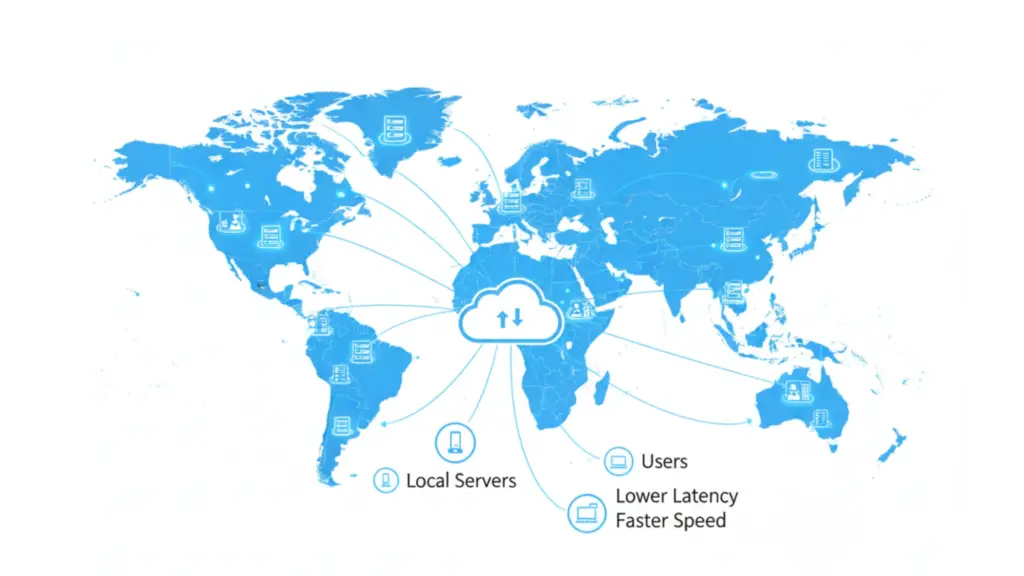
Edge computing processes data near users instead of in distant data centers.
Traditional cloud computing sends all requests to centralized servers. Users in Australia accessing US servers experience 200-300ms latency.
Edge computing deploys servers globally. Users connect to nearby locations, reducing latency to 10-30ms.
How edge computing works:
Content and applications distribute across edge locations worldwide. Each location serves users in its region.
User requests route to the nearest edge server automatically. Geographic proximity creates faster response times.
Edge servers handle processing locally when possible. Only necessary data flows to central data centers.
Edge computing growth:
Gartner predicts 75% of enterprise data will be processed at the edge by 2025, up from 10% in 2018.
The edge computing market will reach $87.3 billion by 2026, growing at 37.4% annually according to Markets and Markets research.
Common edge computing use cases:
Content delivery networks distribute static content globally. Images, videos, and files serve from nearby locations.
IoT device processing analyzes sensor data locally. Smart factories process production data at the edge, sending summaries to cloud.
Real-time gaming requires low latency. Edge servers reduce lag for competitive online gaming.
Video streaming adapts quality based on connection. Edge locations optimize delivery for each viewer’s network conditions.
AI inference runs models closer to users. Chatbots and recommendation engines respond faster from edge deployments.
Combining Dedicated Servers with Edge Computing
Hybrid architectures leverage strengths of unmanaged dedicated servers and edge computing simultaneously.
Dedicated servers handle centralized processing, databases, and core business logic. Edge locations serve content and handle simple requests.
This combination delivers both performance and control.
Hybrid architecture benefits:
Global performance with centralized control maintains consistency while serving users quickly worldwide.
Cost optimization balances expenses. Expensive dedicated resources handle only essential processing. Cheaper edge locations serve content.
Security consolidation protects sensitive data. Customer databases and payment processing remain on controlled dedicated servers.
Flexibility adapts to changing needs. Scale edge locations independently from central infrastructure.
How the flow works
• A user opens your website.
• Static content loads from the nearest edge location.
• Sensitive or dynamic actions go to the dedicated server.
• Results return to the user fast.
What dedicated servers handle and why
Dedicated servers act as the secure core.
• Databases
Store customer data, orders, and records in one controlled place. Central storage prevents data conflicts and loss.
• Authentication
Handle logins, passwords, and user permissions securely. Central validation reduces security risks.
• Payments
Process transactions and store payment logs. Dedicated hardware meets compliance and audit needs.
• Admin panels
Run dashboards and internal tools safely. Access stays restricted to trusted users only.
• APIs
Manage data exchange between systems. Central APIs keep logic consistent and predictable.
Why this matters
Sensitive operations stay isolated. Performance stays stable under load.
What edge locations handle and why
Edge locations act as global delivery points.
• Images and videos
Serve media files from nearby servers. Page loads feel instant for users worldwide.
• CSS and JavaScript
Deliver site styling and scripts fast. Browsers render pages quicker.
• Cached pages
Store ready made page versions. Repeat visitors get faster responses.
• Search results
Serve frequently requested queries locally. This reduces server strain.
• Public content
Deliver blogs, landing pages, and product pages at scale.
What this split achieves
• Lower page load time for global users.
• Reduced load on the dedicated server.
• Better uptime during traffic spikes.
• Strong security for critical systems.
• Predictable performance at scale.
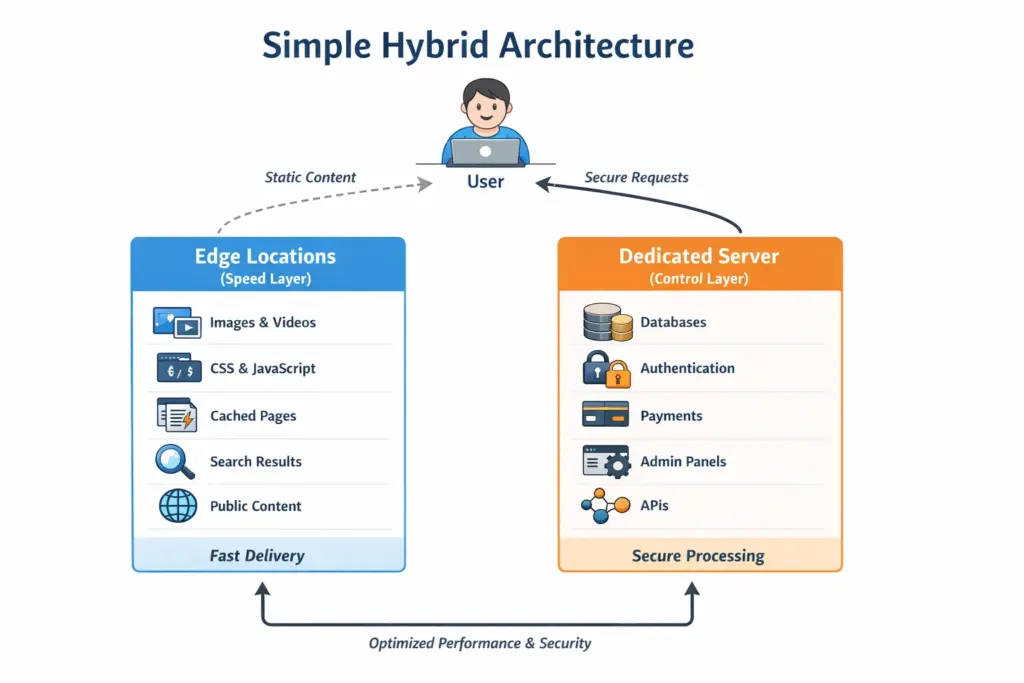
This structure works best for growing businesses, SaaS platforms, ecommerce stores, and content heavy websites.
Use Cases
Real-world implementation reveals hybrid architecture advantages.
E-commerce platform example:
Product catalog and images distribute to edge locations globally. Users browse products with 10-20ms page load times.
Shopping cart and checkout process on dedicated servers. Secure payment processing requires dedicated infrastructure control.
Order processing and inventory management run centrally. Complex business logic executes on powerful dedicated hardware.
Customer service chatbot deploys at edge locations. Low latency creates responsive user interactions.
Performance results:
| Metric | Edge-Only | Dedicated-Only | Hybrid Architecture |
| Global average latency | 25ms | 180ms | 28ms |
| Checkout security | Basic | Excellent | Excellent |
| Infrastructure cost | High | Moderate | Optimized |
| Content delivery speed | Excellent | Poor | Excellent |
| Database performance | Limited | Excellent | Excellent |
Hybrid approach delivers 85% of edge performance with 90% of dedicated security at 60% of combined cost.
Implementation architecture:
Dedicated server cluster hosts:
- MySQL database (customer data, orders, inventory)
- Admin panels and management tools
- Payment processing systems
- Analytics and reporting
- API services
Edge locations serve:
- Product images and videos
- CSS and JavaScript files
- Static product pages
- Search results
- CDN-cached content
This separation optimizes both performance and security while controlling costs.
SaaS application example:
User interface distributes via edge computing. Application loads instantly from nearby locations worldwide.
API gateway on dedicated servers routes requests securely. Authentication and authorization happen centrally.
Application logic processes on dedicated infrastructure. Complex calculations utilize powerful hardware.
User-generated content caches at edge locations. Recently uploaded files serve quickly to other users.
Media streaming platform example:
Video content stores on dedicated servers with massive storage. Original high-quality files remain centrally managed.
Transcoded videos cache at edge locations. Multiple quality levels serve from nearby locations.
User authentication verifies on dedicated servers. Access control policies enforce subscription rules centrally.
Analytics processing aggregates on dedicated hardware. Complex viewing pattern analysis requires powerful computing.
Is a Dedicated Server Still Worth for Future?
Hardware improvements continue accelerating. DDR5 RAM, PCIe 5.0 storage, and next-generation CPUs deliver performance gains.
Energy efficiency reduces operating costs. Modern processors provide more power per watt.
Automation simplifies management. Infrastructure-as-code tools make dedicated servers as manageable as cloud resources.
Hybrid integration improves. Dedicated servers integrate seamlessly with edge and cloud services.
Affordable dedicated server hosting plans for businesses
| Server Name | Processor | Memory | Disk | Bandwidth | Setup | Price (Monthly) |
| Intel Core2Duo | Intel Core2Duo (2c/2t @ 1.6GHz) | 4GB DDR2 | 1 x 250GB HDD | Unlimited @ 100Mbps | Free | $20.00 |
| Intel E3-1245v2 | Intel Xeon E3-1245v2 (4c/8t @ 3.4GHz) | 32GB DDR4 | 2 × 480GB SSD | Unlimited @ 100Mbps | Fee Required | $31.98 |
| Intel Xeon 1520 | Intel Xeon-D 1520 (4c/8t @ 2.2GHz) | 32GB DDR4 | 2 × 2TB HDD | Unlimited @ 300Mbps | Fee Required | $37.60 |
| Xeon E3-1230v2 | Intel Xeon E3-1230v2 (4c/8t @ 3.2Ghz) | 32GB DDR3 | 1 x 500GB SSD | Unlimited @ 1Gbps | Free | $50.00 |
| Intel D-2123iT | Intel Xeon D-2123iT (4c/8t @ 2.2GHz) | 32GB DDR4 | 2 × 4TB HDD | Unlimited @ 500Mbps | Fee Required | $69.98 |
| AMD Ryzen-3600 | AMD Ryzen-5 3600 (6c/12t @ 3.6GHz) | 64GB DDR4 | 2 x 512GB NVMe | Unlimited @ 1Gbps | Free | $81.14 |
How to Optimize Your Website on a Dedicated Hosting Plan
Proper optimization extracts maximum value from dedicated hardware.
Server configuration optimization:
Operating system tuning adjusts kernel parameters for your workload. Web servers need different settings than database servers.
Key OS optimizations:
# Increase file descriptor limits
ulimit -n 65535# Optimize network stack
sysctl -w net.core.somaxconn=65535
sysctl -w net.ipv4.tcp_max_syn_backlog=8192
# Adjust memory management
sysctl -w vm.swappiness=10Web server optimization configures Apache, Nginx, or LiteSpeed for peak performance.
Nginx configuration example:
worker_processes auto;

worker_rlimit_nofile 65535;

events {

    worker_connections 4096;

    use epoll;

}

http {

    sendfile on;

    tcp_nopush on;

    tcp_nodelay on;

    keepalive_timeout 65;

    gzip on;

    gzip_comp_level 6;

}
Database optimization tunes MySQL or PostgreSQL for your data patterns.
MySQL optimization parameters:
innodb_buffer_pool_size = 70% of RAM

max_connections = 500

query_cache_size = 128M

innodb_log_file_size = 512M
Application layer optimization:
PHP optimization configures execution environment efficiently.
PHP 8.2 configuration:
memory_limit = 256M

max_execution_time = 300

opcache.enable = 1

opcache.memory_consumption = 256

opcache.max_accelerated_files = 20000
Caching implementation reduces database load dramatically.
Caching strategy:
- Object cache (Redis or Memcached) for database queries
- Page cache for complete HTML output
- Browser cache for static assets
- CDN cache for global distribution
Performance monitoring:
Key metrics to track:
| Metric | Target | Warning Threshold | Critical Threshold |
| CPU utilization | <70% | 80% | 90% |
| RAM usage | <80% | 85% | 95% |
| Disk I/O wait | <10% | 20% | 30% |
| Network bandwidth | <70% capacity | 80% capacity | 90% capacity |
| Response time | <500ms | 1000ms | 2000ms |
Monitoring tools:
- New Relic for application performance
- Datadog for infrastructure monitoring
- Prometheus + Grafana for custom metrics
- Uptime Robot for availability monitoring
When Dedicated Hosting Is Not the Right Choice
Dedicated hosting does not fit every workload.
Avoid dedicated servers when:
• You run a low traffic website under 5,000 monthly visits.
• Your workload changes daily and needs instant scaling.
• You lack technical support or managed hosting budget.
• Your application performs well on managed cloud platforms.
• You only serve one local region with no latency sensitivity.
Shared or KVM VPS hosting works better for early stage projects with predictable traffic and limited budgets.
How to Migrate to Dedicated Hosting With Edge Computing
A structured migration avoids downtime.
Migration steps:
• Audit current traffic, storage, and resource usage.
• Select dedicated server specs based on peak load.
• Deploy edge or CDN layer for static assets.
• Sync data from old server using rsync or snapshots.
• Test staging environment with real traffic simulation.
• Switch DNS during low traffic hours.
• Monitor logs, latency, and error rates for 48 hours.
Most migrations complete within one business day.
When Edge Computing Adds No Value
Edge computing does not benefit all workloads.
Edge adds limited value when:
• Users are concentrated in one city.
• Applications rely on real time database writes.
• Content updates every second.
• Internal tools serve employees only.
• Traffic volumes remain small.
Dedicated servers alone handle these cases efficiently.
24/7 Support, DDoS Protection, and Firewalls
Essential features determine hosting plan value.
24/7 technical support provides assistance whenever issues arise.
Support channel options:
- Live chat (fastest response)
- Phone support (complex issues)
- Ticket system (detailed problems)
- Emergency hotline (critical outages)
Support quality indicators:
| Metric | Basic Support | Premium Support | Enterprise Support |
| Response time | 2-4 hours | 30-60 minutes | 5-15 minutes |
| Availability | Business hours | 24/7 | 24/7 + dedicated team |
| Expertise level | Level 1 | Level 2-3 | Senior engineers |
| Proactive monitoring | No | Basic | Comprehensive |
DDoS protection prevents service disruption from attacks.
Protection capabilities needed:
- Volumetric attack mitigation (10+ Gbps capacity)
- Protocol attack filtering
- Application layer protection
- Automatic detection and mitigation
- Real-time traffic analysis
DDoS protection implementation:
- Always-on monitoring
- Automatic scrubbing when attacks detected
- Clean traffic forwarded to your server
- Attack reports and analysis
Firewall configuration options:
Hardware firewalls protect network level. Sit between internet and your server, blocking threats before they reach your infrastructure.
Software firewalls protect server level. Installed on server, providing granular control over applications.
Web application firewalls protect application level. Analyze HTTP traffic for malicious requests.
Security feature checklist:
- DDoS protection with 10+ Gbps capacity
- Hardware firewall included
- Free SSL certificates
- Automated malware scanning
- Intrusion detection system
- Regular security audits
- Backup services (daily minimum)
- Disaster recovery options
Additional important features:
Network uptime guarantee ensures availability. Look for 99.9% minimum SLA with compensation for downtime.
Bandwidth allocation determines traffic handling. Unmetered options prevent overage charges.
Scalability options support growth. Easy upgrade paths prevent migration headaches.
Data center locations affect latency. Choose locations near your primary users.
Backup services protect against data loss. Automated daily backups with off-site storage provide peace of mind.
Cheap Managed Dedicated Server Hosting with 24/7 Support
Managed services eliminate technical complexity while maintaining affordability.
What managed hosting includes:
Server setup and configuration gets handled by experts. Your server arrives ready for applications.
Operating system maintenance keeps software current. Security patches apply automatically.
Security monitoring detects threats proactively. Issues get resolved before impacting operations.
Performance optimization tunes configurations for maximum speed. Regular adjustments maintain peak performance.
Backup management protects data automatically. Daily backups with tested restoration procedures.
Technical support resolves issues quickly. Expert engineers available around the clock.
Dedicated Server Hosting with DDoS Protection and Firewall
Integrated security features protect against evolving threats.
Comprehensive DDoS protection:
Multi-layered defense stops attacks at multiple levels. Network, protocol, and application layer protection work together.
Automatic detection identifies attacks instantly. Traffic analysis reveals abnormal patterns triggering mitigation.
Scrubbing centers clean malicious traffic. Legitimate requests pass through while attacks get blocked.
Always-on protection prevents zero-day attacks. No manual activation required during incidents.
DDoS protection capacity requirements:
| Business Size | Minimum Protection | Recommended Protection |
| Small (0-10K visitors/day) | 5 Gbps | 10 Gbps |
| Medium (10-50K visitors/day) | 10 Gbps | 20 Gbps |
| Large (50-200K visitors/day) | 20 Gbps | 50 Gbps |
| Enterprise (200K+ visitors/day) | 50 Gbps | 100+ Gbps |
Advanced firewall features:
Stateful packet inspection examines connection context. Firewalls track relationship between packets for better security.
Geographic filtering blocks traffic from specific countries. Reduce attack surface by limiting regional access.
Rate limiting prevents brute force attacks. Limit connection attempts per IP address.
Application-aware rules protect specific services. Different rules for web, email, database, and other services.
Integrated security stack:
| Security Layer | Protection Type | Coverage |
| Network firewall | Infrastructure | All network traffic |
| DDoS protection | Availability | Volumetric attacks |
| Web application firewall | Application | HTTP/HTTPS traffic |
| Intrusion detection | Behavior | Anomalous activity |
| Malware scanning | Content | Files and attachments |
Conclusion
The future of hosting combines dedicated servers’ control with edge computing’s speed. Businesses implementing hybrid architectures gain competitive advantages through superior performance and reliability.
Ucartz.com provides complete dedicated hosting solutions with enterprise features at business-friendly prices. Our infrastructure, security, and support enable businesses to focus on growth while we handle technology.
Your hosting choice impacts every customer interaction. Choose dedicated servers with edge integration for optimal global performance and security.
FAQ
Q1: Are dedicated servers still worth it with edge computing?
A: Yes, they work best together. Dedicated servers act as your powerful, secure central hub, while edge computing delivers content from local nodes for instant speed.
Q2: How does edge computing improve my dedicated server?
A: Edge computing drastically reduces load times for global users by caching and serving data nearby, taking strain off your central dedicated server.
Q3: Can I get edge computing with my dedicated hosting plan?
A: Many modern hosting providers now offer dedicated server plans with integrated CDN or edge network services to create a complete, high-performance solution.
Q4: What’s better for my business: dedicated server or edge computing?
A: For most businesses, it’s not a choice using a dedicated server for core applications and edge computing for global content delivery creates the optimal hybrid architecture.
Q5: Is a dedicated server with edge computing more secure?
A: Yes, this combination enhances security: your dedicated server is a controlled, isolated fortress for critical data, while the edge can filter and absorb DDoS attacks before they reach it.